Running a business in today’s world means managing sales, inventory, customers, accounting, HR, and operations — all at the same time. When these processes are handled manually or across multiple disconnected systems, businesses face delays, errors, and slow decision-making.
This is exactly where an ERP (Enterprise Resource Planning) system comes in.
In this guide, I’ll explain how an ERP system works, in simple terms, based on years of implementing Odoo ERP for companies across the GCC — from engineering groups to trading businesses, retail stores, restaurants, and service companies.
What Is an ERP System?
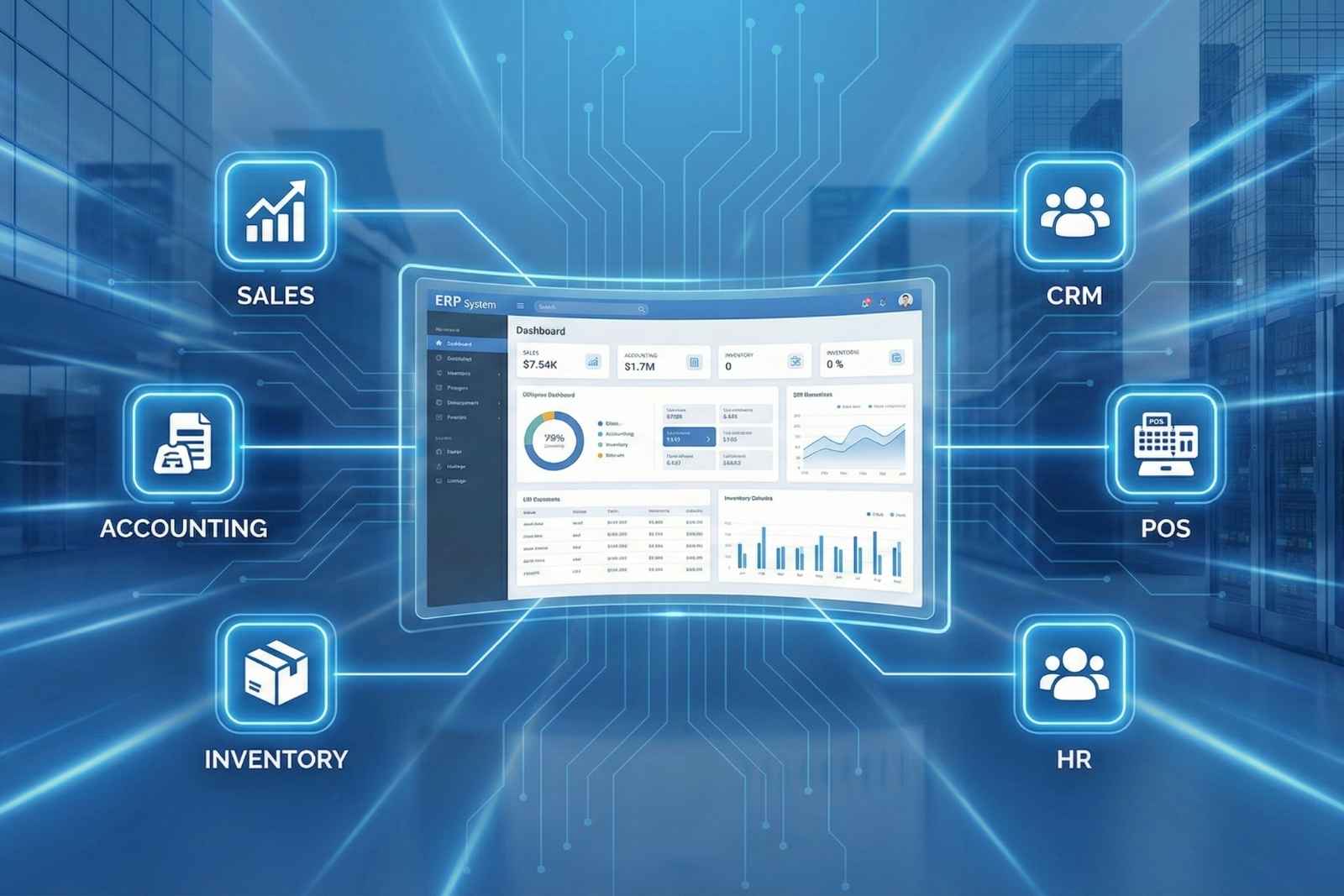
An ERP system is a software platform that brings your entire business into one place.
Instead of separate tools for accounting, sales, HR, and inventory, ERP connects everything so your team works on one unified system.
Think of it as your company’s central brain — managing every operation from one dashboard.
How ERP Works: The Simple Breakdown
1. All Business Departments Connect Into One System
When you perform an action in one department, ERP automatically updates the others.
Example:
A sales person creates a quotation → ERP updates inventory → accounts are notified → delivery team sees the order → CRM tracks customer updates.
No manual communication. No follow-ups. No errors.
Your Content Goes Here
2. A Single Database for All Your Information
One of the biggest strengths of ERP is that every module shares the same database.
This ensures:
-
No duplicate data
-
No inconsistency
-
Real-time visibility
-
Faster decisions
Your team always sees the same information — whether they are in sales, accounts, warehouse, or management.
3. Real-Time Reporting
ERP systems automatically generate live reports for:
-
Sales performance
-
Stock levels
-
Employee attendance
-
Expenses
-
Profit & loss
-
Taxation
-
Customer activity
This helps business owners take the right decisions without waiting for manual updates from teams.
Modules That Make ERP Work (Explained Simply)
Your blog focuses on the modules you use most in your projects: Sales, Accounting, Inventory, CRM, POS, and HR.
1. Sales
The Sales module handles:
-
Quotation
-
Sales Order
-
Product pricing
-
Customer follow-up
-
Delivery management
Everything starts here — and automatically updates all other departments.
2. Inventory
The Inventory module tracks:
-
Stock movements
-
Item availability
-
Warehouse transfers
-
Batch and expiry
-
Delivery and returns
It ensures you never run out of stock or overstock unnecessary items.
3. CRM (Customer Relationship Management)
CRM helps your sales team:
-
Track leads
-
Convert opportunities
-
Manage pipelines
-
Follow up on clients
-
Close deals faster
This is the heartbeat for business growth.
4. Accounting
The Accounting module syncs with every other activity:
-
Sales → Invoice
-
Purchase → Bills
-
Payments → Bank entries
-
POS → Daily cash report
It ensures clean, accurate books without manual data entry.
5. POS (Point of Sale)
Perfect for retail, restaurants, and supermarkets.
POS syncs automatically with Inventory & Accounting.
You get:
-
Real-time stock update
-
Daily sales report
-
Cash and card tracking
-
Multi-terminal support
We also integrate POS hardware for a seamless experience.
6. HR
The HR module handles:
-
Attendance
-
Leaves
-
Payroll
-
Contracts
-
Employee records
It brings transparency and structure into your workforce management.
Customizations & Integrations — Where ERP Becomes Truly Powerful
Most ERPs are powerful, but real business value comes from customizing them to your workflow.
Over the years, we’ve delivered:
-
Custom module workflows
-
Tailored approval hierarchies
-
Automated reports
-
Advanced user permissions
-
Multi-company setups
-
Mobile app integrations
And more.
We also integrate:
-
Payment gateway systems
-
POS hardware (scanners, printers, cash drawers)
-
Accounting sync with external systems
These integrations help businesses run faster and eliminate manual work completely.
Real Case Study: Group of Companies (Engineering, Trading, Services)
One of our recent implementations involved a multi-division group of companies in the GCC.
Challenges They Faced
-
Old-school manual processes
-
No ERP knowledge among staff
-
Large volume of data scattered across Excel files
-
No real-time visibility
-
Accounting done manually
What We Did
-
Migrated all their historical data into Odoo
-
Completed full accounts setup aligned with their structure
-
Customized various modules to match their workflow
-
Integrated POS hardware and payment systems
-
Trained their entire team across departments
The Outcome
Today, their entire business — sales, purchase, HR, inventory, accounting, CRM — runs fully on Odoo.
They operate faster, smarter, and with complete visibility.
Why Businesses Choose Us for ERP Implementation
From years of hands-on experience, our approach stands out:
-
Fast delivery
-
Deep customization experience
-
Strong problem-solving skills
-
Proven testing process
-
Long-term support & maintenance
We’ve worked with businesses that had no ERP knowledge at all — and helped them transform into modern, data-driven companies.
Who Should Use an ERP?
If you are a business owner in the GCC and facing:
-
Manual processes
-
Slow reporting
-
Inventory mistakes
-
Accounting delays
-
Multibranch confusion
-
Department miscommunication
Then ERP is not a luxury — it’s a necessity.
Final Thoughts
An ERP system works by making your business organized, connected, and intelligent.
It replaces guesswork with data.
It replaces manual work with automation.
And it helps you scale smoothly without losing control.
Interested in Implementing ERP for Your Business?
We help companies across the GCC transition to a fully digital, efficient workflow using Odoo ERP.
Click below to schedule a demo and see how ERP can transform your business.
Schedule a Demo Today